


What is Chevy MyLink?
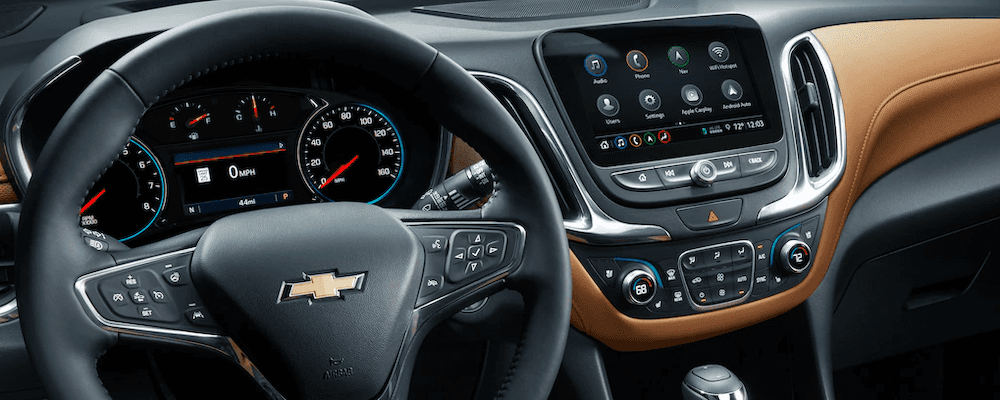
Chevy MyLink is Chevrolet’s touchscreen infotainment technology found in many older Chevrolet vehicles. It provides access to smartphone connectivity, hands-free calling, music, navigation, and available vehicle settings through a central display. Depending on the model year and equipment, Chevy MyLink may also support Apple CarPlay, Android Auto, and Teen Driver technology. Although Chevrolet has transitioned to newer infotainment systems, MyLink remains useful for drivers throughout Lincoln, Omaha, Fremont, and surrounding Nebraska communities. Learn how Chevy MyLink works, which features it offers, and how to make the most of the technology in your Chevrolet vehicle.
What Is Chevy MyLink and How Does It Work?
Chevy MyLink is an infotainment system that combines entertainment, communication, and available navigation features into a touchscreen interface. Introduced on earlier Chevrolet models, the system allows drivers to connect compatible smartphones, control audio sources, access supported applications, and manage certain vehicle functions.
Chevy MyLink features vary by model year, vehicle, and installed equipment. Common capabilities include:
- Touchscreen controls: Access available audio, phone, navigation, and vehicle settings through the center display.
- Bluetooth connectivity: Pair compatible smartphones for hands-free calls and wireless audio streaming.
- Apple CarPlay and Android Auto: Use compatible smartphone applications through the vehicle display on supported models.
- Voice commands: Control certain communication, entertainment, and smartphone features using available voice recognition.
- Navigation: Access available built-in navigation or compatible smartphone navigation applications.
- Teen Driver technology: Configure certain driving-related settings and review an in-vehicle driving report card on equipped Chevrolet models.
Chevrolet has since introduced newer infotainment technologies, including systems with available Google built-in. Chevy MyLink generally refers to the earlier generation of Chevrolet infotainment systems, so drivers should check their vehicle’s owner’s manual to identify the specific system and supported features.
Chevy MyLink Smartphone Connectivity: Apple CarPlay and Android Auto
Compatible Chevy MyLink systems support Apple CarPlay and Android Auto, allowing drivers to access selected smartphone applications through the vehicle’s touchscreen. These features can provide access to navigation, music, calls, and messaging using familiar smartphone interfaces.
Apple CarPlay and Android Auto are not available on every Chevy MyLink-equipped vehicle. Compatibility depends on the vehicle’s model year, infotainment hardware, software, and smartphone. Earlier MyLink systems may offer Bluetooth connectivity without smartphone projection.
What Can You Do With Apple CarPlay and Android Auto?
When supported, Apple CarPlay and Android Auto provide convenient access to compatible smartphone functions while helping drivers limit unnecessary interaction with their phones.
- Make and receive calls: Use supported hands-free calling features and access permitted phone contacts.
- Send and receive messages: Use compatible voice-assistant functions to listen to or respond to messages.
- Stream music and podcasts: Access compatible audio applications through the vehicle’s speakers and display.
- Use smartphone navigation: Get directions through supported applications such as Apple Maps or Google Maps.
- Access voice assistants: Use Siri with compatible Apple CarPlay systems or supported Google voice-assistant functions with Android Auto.
Most older Chevy MyLink systems equipped with Apple CarPlay or Android Auto require a compatible USB connection. Wireless smartphone projection is available on certain newer Chevrolet infotainment systems, but should not be assumed for vehicles equipped with MyLink. Drivers should complete setup while parked and use voice controls when appropriate.
How to Connect Your Phone to Chevy MyLink
To connect a smartphone to Chevy MyLink, enable Bluetooth on your phone and use the vehicle’s infotainment screen to begin pairing. Once connected, you can use supported hands-free calling and audio features. The exact menu names and available functions vary by Chevrolet model and MyLink version.
- Park your Chevrolet: Turn on the vehicle or infotainment system while safely parked.
- Enable Bluetooth: Open your smartphone’s settings and make sure Bluetooth is turned on.
- Open the phone menu: Select the Phone icon or available Bluetooth settings on the Chevy MyLink touchscreen.
- Add a device: Choose the option to pair or connect a new phone.
- Select your Chevrolet: Find the vehicle in your smartphone’s available Bluetooth devices.
- Confirm the connection: Verify that the pairing codes match and accept the connection requests.
- Allow supported permissions: If desired, enable access to contacts, calling, and other compatible phone functions.
After pairing, your phone may reconnect automatically when Bluetooth is enabled and the vehicle is started. If your Chevrolet supports Apple CarPlay or Android Auto, connect your smartphone using the appropriate USB port and follow the prompts on your phone and vehicle display.
If your phone does not connect, confirm compatibility, restart the devices, or remove the existing Bluetooth pairing and complete the process again. Consult your Chevrolet owner’s manual for vehicle-specific connection instructions.
Chevy MyLink Navigation, Entertainment, and Wi-Fi Features
Chevy MyLink offers entertainment and connectivity features that can make everyday driving more convenient. Depending on the vehicle and infotainment configuration, drivers may have access to built-in navigation, satellite radio, audio streaming, and an available Wi-Fi hotspot.
- Turn-by-turn navigation: Select MyLink systems include built-in navigation with route guidance. Compatible Apple CarPlay or Android Auto systems may also display smartphone navigation applications.
- SiriusXM services: Equipped vehicles may support SiriusXM satellite radio and certain additional information services, subject to compatibility and subscription availability.
- Available 4G LTE Wi-Fi hotspot: Certain Chevrolet vehicles offer built-in hotspot capability for compatible devices. Service generally requires an eligible data plan and network coverage.
- Bluetooth audio streaming: Play music, podcasts, and other audio content from a paired compatible smartphone.
- USB media connectivity: Supported systems allow drivers to connect compatible devices for audio playback and other available functions.
- Available in-vehicle applications: Some older MyLink versions supported integrated applications and services, including Pandora and Stitcher. Availability may have changed as applications and services evolved.
Not every Chevy MyLink system includes these capabilities. Built-in navigation may require specific equipment, while connected services can require an active subscription or compatible smartphone data connection. Drivers using MyLink for trips across Nebraska should also consider cellular coverage when relying on connected navigation or streaming applications.
Chevy MyLink Teen Driver Technology and Safety Features
Chevrolet Teen Driver is an available vehicle feature that helps parents and guardians encourage responsible driving habits by setting certain limits and reviewing driving information. On equipped vehicles, Teen Driver settings are accessible through the Chevrolet infotainment system, including compatible Chevy MyLink systems.
Teen Driver uses a designated vehicle key and a protected settings menu to activate supported features. Depending on the model and equipment, available functions may include:
- Seat belt audio restrictions: Mute the audio system until the driver and, in certain vehicles, the front passenger fasten their seat belts.
- Audio volume limits: Set a maximum volume for the vehicle’s entertainment system.
- Speed warnings: Provide visual and audible alerts when the vehicle exceeds a selected speed threshold.
- Available speed limiter: Restrict maximum vehicle speed on certain equipped models.
- In-vehicle report card: Record available driving information such as distance traveled, maximum speed, overspeed warnings, and certain vehicle safety-system events.
- Available Buckle to Drive: Help encourage seat belt use by temporarily preventing the vehicle from shifting out of Park when applicable seat belt requirements are not met.
Teen Driver is not a real-time vehicle tracking system and does not replace attentive driving, supervision, or driver education. Available settings and report card information vary by Chevrolet model year.
How Do You Set Up Chevy Teen Driver?
On equipped vehicles, Teen Driver can be configured through the infotainment system’s settings menu. The setup process generally involves creating a PIN and registering a designated vehicle key.
- Park the vehicle and open the infotainment system’s Settings menu.
- Select the Vehicle settings and locate Teen Driver, if available.
- Create a four-digit PIN to protect the Teen Driver settings.
- Follow the on-screen instructions to register the designated vehicle key.
- Configure available audio volume limits, speed warnings, and other supported settings.
- Use the protected Teen Driver menu to review the in-vehicle report card after the registered key has been used.
For families with new drivers in Lincoln, Omaha, or nearby Nebraska communities, Teen Driver can support conversations about safe driving habits, speed awareness, and responsible vehicle use. Refer to the owner’s manual for the specific setup procedure and features available in your Chevrolet.
Chevy MyLink vs. Chevrolet Infotainment System: What’s the Difference?
The primary difference between Chevy MyLink and newer Chevrolet infotainment systems is the generation of technology and the available connected features. Chevy MyLink was used in earlier Chevrolet vehicles, while more recent models use updated Chevrolet Infotainment Systems that may offer different touchscreen layouts, smartphone integration, and built-in applications.
- Chevy MyLink: Found in previous generations of Chevrolet vehicles, with available Bluetooth, touchscreen controls, smartphone connectivity, navigation, and entertainment features.
- Newer Chevrolet Infotainment Systems: Offer updated interfaces and available connectivity features that depend on the specific vehicle and system.
- Google built-in: Available on select newer Chevrolet vehicles, providing integrated access to supported Google services, including Google Maps, Google Assistant, and compatible applications through Google Play. Certain features require an eligible service plan or data connection.
Smartphone compatibility should be verified for each Chevrolet vehicle rather than assumed based on the infotainment system’s age. Some newer systems support Apple CarPlay and Android Auto, while certain Google built-in configurations use integrated applications instead of smartphone projection.
If you are comparing a used Chevrolet with MyLink against a newer model, consider which navigation, phone connectivity, and entertainment features you use most often. Checking the actual vehicle’s infotainment equipment can help you choose the system that best fits your needs.
How to Update Chevy MyLink Software
Chevy MyLink software updates depend on the vehicle’s model year, infotainment hardware, and available manufacturer support. Some Chevrolet infotainment systems support software updates through vehicle settings or connected services, while older MyLink systems may require dealership assistance for applicable updates.
Before attempting an update, identify your Chevrolet model year and infotainment version. Not all systems support over-the-air updates, and installing newer software does not necessarily add features that the original hardware does not support.
For additional instructions, read our guide on how to update Chevy MyLink software. If your system experiences repeated freezing, Bluetooth connection issues, or other persistent problems, a Chevrolet service professional can help determine whether applicable software updates or additional troubleshooting may be needed.
Frequently Asked Questions About Chevy MyLink
What is Chevy MyLink used for?
Chevy MyLink is used to control compatible entertainment, communication, navigation, and certain vehicle settings through a Chevrolet touchscreen infotainment system. Depending on the model year and equipment, features may include Bluetooth calling, audio streaming, Apple CarPlay, Android Auto, and access to available navigation applications.
Does Chevy MyLink work with Apple CarPlay and Android Auto?
Yes, certain Chevy MyLink systems support Apple CarPlay and Android Auto, but these features are not available on every model or model year. Supported older systems generally require a compatible smartphone and USB connection. Check your Chevrolet owner’s manual or infotainment specifications to confirm compatibility.
How do I connect my phone to Chevy MyLink?
To connect your phone to Chevy MyLink, enable Bluetooth on your smartphone, open the vehicle’s Phone or Bluetooth menu, and select the option to pair a new device. Choose your Chevrolet on your phone and confirm the pairing code. For supported Apple CarPlay or Android Auto features, connect using the appropriate USB port and follow the on-screen instructions.
Can I use Chevy MyLink navigation without a subscription?
Some Chevrolet vehicles equipped with built-in MyLink navigation can provide route guidance without an ongoing navigation subscription. However, live traffic information, connected services, and certain additional features may require an active subscription or data connection. Navigation through Apple CarPlay or Android Auto typically uses compatible smartphone applications and may require cellular data.
Can Chevy MyLink be updated?
Yes, certain Chevy MyLink systems may have applicable software updates, although availability and installation methods depend on the model year and infotainment hardware. Older vehicles may require dealership assistance. Software updates do not guarantee access to features such as Apple CarPlay or Android Auto if the existing system does not support them.
Is Chevy MyLink available on new Chevrolet vehicles?
Chevy MyLink is the name used for infotainment systems found in earlier Chevrolet models. Newer Chevrolet vehicles use updated Chevrolet Infotainment Systems, including available configurations with Google built-in. Features differ by model and equipment, so drivers shopping for a new Chevrolet should review the specific vehicle’s infotainment specifications.
Learn More About Chevrolet Infotainment Technology at Sid Dillon
Chevy MyLink provides touchscreen controls, smartphone connectivity, entertainment features, and available navigation and Teen Driver technology in many earlier Chevrolet vehicles. Understanding your system’s capabilities can help you stay connected and use its features more effectively. At Sid Dillon, we help drivers throughout Lincoln, Fremont, Omaha, Blair, and surrounding Nebraska communities compare Chevrolet technology and vehicle features. Browse our new Chevrolet inventory to see available infotainment systems, or contact Sid Dillon with questions about Chevrolet connectivity, smartphone compatibility, and vehicle technology.
Latest on Chevy Models
2026 Chevy Silverado EV Trims Guide – First Look
A clear way to choose your 2026 Silverado EV trim The 2026 Chevy Silverado EV brings electric capability to the Silverado name with a trim lineup built around three different directions: style-forward Custom, capability-focused LT, and off-road-ready Trail Boss. If you want the full model overview first, start at our 2026 Chevy Silverado EV research…
2026 Chevy Trailblazer Trims Guide – First Look
A simple way to choose your 2026 Trailblazer trim The 2026 Chevy Trailblazer is a small SUV that Chevrolet builds around everyday flexibility, easy tech, and four distinct trim personalities. If you want the full model overview first, start at our 2026 Chevy Trailblazer research hub. This blog is designed to complement our trims page….
2026 Chevy Blazer Trims Guide – First Look
A simple way to choose your 2026 Blazer trim The 2026 Chevy Blazer is a midsize SUV built around bold design, everyday versatility, and multiple trim personalities. If you want the full overview first, start at our 2026 Chevy Blazer research hub. This blog is designed to complement our trims page. Instead of listing every…
